8.6.04
Dual Language Learner
ChildPlus: Dual Language Learner Module entry
Only for Dual Language Learners
Enter within 3 days of completion of the Family Demographics form found in the Enrollment Packet
This information must be entered each program year.
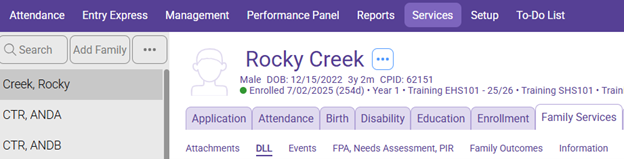
Select The Participant from the Participants List in the Services Tab
Select the Family Services Module
Click on the DLL Tab
Click on the “Add Record” box
All answers can be found on the Family Demographics form under Child Information
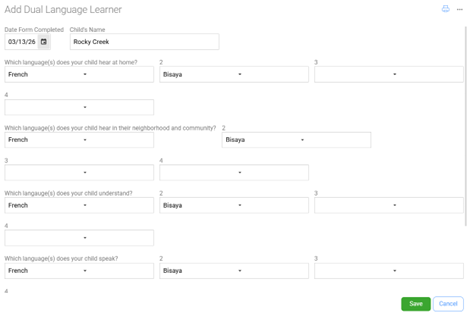
- Date Form Completed: Enter the date you completed the form
- Enter Child’s Name
- Which language(s) does your child hear at home? Select up to four languages the child hears at home. (This includes the language(s) spoken by parents, grandparents, siblings, extended family, or others living within or visiting the home)
- Which languages does your child hear in their neighborhood and community? Select up to four languages the child hears in their neighborhood and (For example, with friends and neighbors, at church, or at after school programs or activities. This is to demonstrate language exposure not to measure language proficiency.)
- Which languages does your child understand? Select up to four languages the child
- Which languages does your child speak? Select up to four languages the child
- In what language would you prefer to receive written communication from us? Select the language preference the parent wants to receive written communications
- In what language would you prefer us to communicate verbally with you? Select the language preference the parents want to receive verbal communication
- Click Save