8.1.1.8
Develop EHS/HS (ASQ3)
Ed staff must complete the ASQ 3 screener within 45 days of entry into each program option (EHS/HS).
Enter within 3 days of completion.
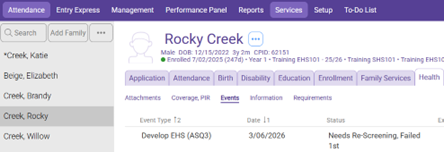
Select the Participant from the Participants List in the Services Tab, select the Health Tab, and then select the Events section
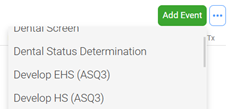
Click on the Green “Add Event” button, then select the “Develop EHS/HS (ASQ3)” Health Event
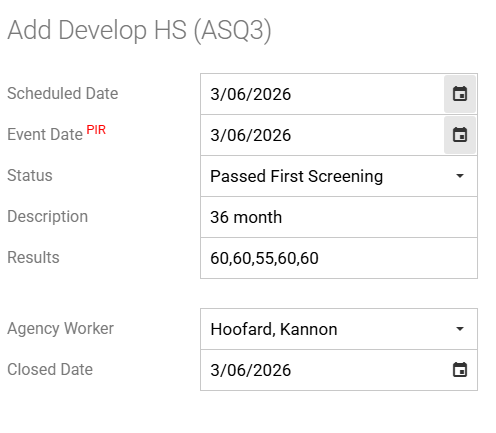
Scheduled Date: Leave blank
Event Date: Enter date the screening was completed
Status: Enter appropriate status code:
Colors refer to the chart on summary page of the ASQ3
Passed First Screening: Scores within the white area on the ASQ3 results page- Enter Closed Date using the same date as the Event Date
Needs Re-Screening, Failed 1st: Scores within the gray area on the ASQ3 results page-Follow the instructions for Develop EHS/HS (ASQ3) Follow Up to add a scheduled follow up action 30 days after initial screening date. Refer to 8.1.1.9 Develop EHS/HS (ASQ3) Follow Up
Failed 1st Screening, Needs Referral: Scores within the black area on the ASQ-3 results page- follow the instructions for Referral for Observation/Consultation
Child has IEP/IFSP: Use when child scores a Needs Re-Screening or Failed 1st and is already receiving services for that area. Child does not need to be rescreened if they are receiving services. Enter Closed Date using the same date as the Event Date
Description: Enter the type of screener (Ex: 36 months)
Results: Enter score of each area as shown (Ex: 60/60/55/60/60) Each must have 5 scores listed
Agency Worker: Ensure the Family Service staff’s name is displayed
Closed Date: If the Status was set to “Passed First Screening” make the date the same as the “Event Date” section, if set to any other Status leave blank
Leave the rest of the boxes blank on the event.
Click Save