
8.4.02
CP Update Eligibility Notes
Whenever you have contact or attempt to contact a family regarding their child’s eligibility, selection, or waitlist status, you need to update the “Eligibility Notes” in ChildPlus.
This allows all parties to be aware of what contact has occurred and what information was shared with/from the family.
- On the “Services” tab, in the “Participants” list, click the relevant child’s name or use the search function above the list to find the participant’s record
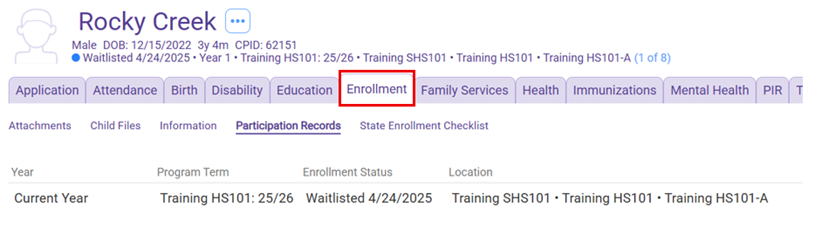
- On the participant’s record, click ”Enrollment”
- Click the relevant program year you want to make the note
4. Scroll down to the “Eligibility” section
5. Type in the “Eligibility Notes” section, including enough detail that other staff will understand what was done
6. Click “Save”
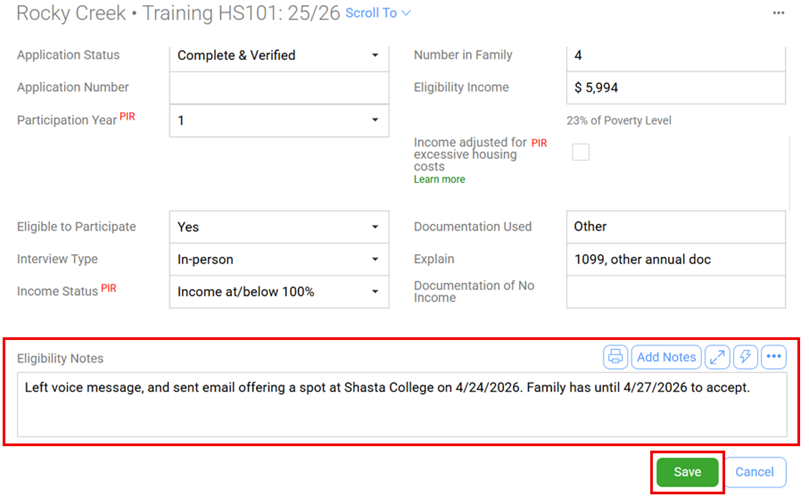
7. ChildPlus automatically inputs the date, time, and name of the individual making the note
