8.1.2.9
Entering ITP (Mid-Year or End of Year)
Family Workers and Ed staff must complete their portion of the ITP. Home Visitors will complete the entire form and enter within 3 days of completion.
Select the Participant from the Participants List in the Services Tab, select the Family Services Tab, and then select the Events section
Click Add Event
Select “Transitions” from the drop-down menu
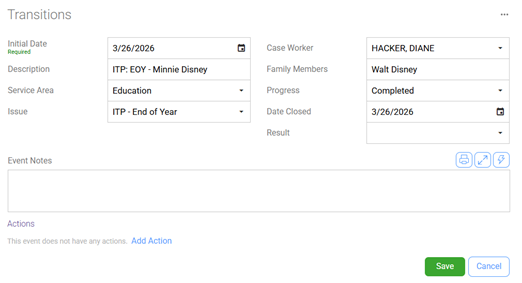
Initial Date: Enter the date the ITP was completed
Description: ITP – Child’s Name (ITP-Midyear – Minnie Disney OR ITP-EOY – Missy Disney)
Service Area: Education
Issue: Select one of the four ITP options
Case Worker: Ensure the Family Service staff’s name is displayed
Family Members: Enter the name of the parent/guardian that signed the ITP
Progress: Completed
Date Closed: Enter date completed
Result: Leave Blank
Event Notes: Enter any information explaining the reason why they left the program.
Click Save