
8.1.4.4.2
Calculating 60 Day ADA Using the Attendance Module in ChildPlus Online
- Navigate to Services Module in ChildPlus online.
- Select a child from the Participant list.
- Select the Attendance module
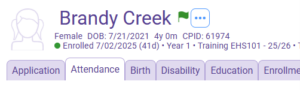
4. Select the current year attendance record, NOT the state record.

5. Select the highlighted “three dots”. (refer to screenshot) and select “Filter”
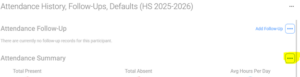
6. Start Date: The day the participant was enrolled
End Date: 60 calendar days from the date the participant was enrolled (this includes holidays and weekends).
Attendance Codes: Leave blank
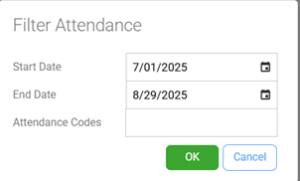
7. Click “OK” use the percentage shown under the “Total Present” for the ADA percentage
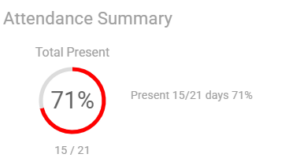
This child has a 60-day ADA of 71%
Document the 60-Day Average Daily Attendance (ADA) on the Family Services Cover Sheet. If the ADA is below 90% within the first 60 days, provide the parent education resource Help Your Child Succeed and document the reason for attendance falling below 90% on the Cover Sheet.