
8.1.1.15
Mental Health ASQ-SE Follow Up
(Ed Staff will rescreen 1 month from the failed event)
If failed rescreen, refer to Disabilities and Mental Health Dept, Refer to S.O.P 5.3.24.2.
Select The Participant from the Participants List In the Services Tab, select the Health Tab, and then select the Events section
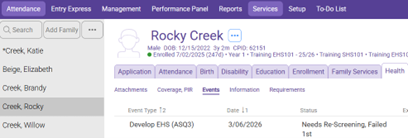
To schedule the ASQ-SE Follow up Action (Rescreen)
Select the failed ASQ-SE Event.
Click the “Add Action” button in the bottom right
Action Type: Follow Up
Scheduled: 1 month from the initial ASQ-SE Events screening date.
Click OK
Click Save
Follow Up on the Scheduled Action (Entering the ASQ-SE Rescreen results)
Select the failed ASQ-SE event
In the actions section, select the follow up action
Action Type: Leave as Follow Up
Scheduled: Leave the previously entered date
Action Date: Enter the date the rescreen was completed
Description: Enter the rescreen total score/cutoff score (Ex: 70/105)
Status: Enter the appropriate status code:
Colors refer to the chart on summary page of the ASQ-SE
Evaluation Complete, No Treatment Needed: If a child passes the rescreen, enter the date the rescreen was completed in the “Closed Date” field in the original event. This will remove the ASQ-SE event from your To-Do list.
Referred, Failed 2nd screening: if the child’s rescreen score is in the refer or monitor section, follow the mental health referral process Referral for Observation/Consultation regardless of the child having and existing IFSP, IEP or IPP and/or receiving services. Add Action Notes stating the date the referral was scanned to Disabilities.
Parent Refused Treatment: If the parent chooses not to sign the referral, enter the date the parent refused to sign the referral in the “Closed Date” field in the original event. This will remove the ASQ-SE event from the To-Do list.
Agency Worker: Ensure the Family Service Staff’s name is indicated.
Leave the rest of the boxes blank.
Click OK
Click Save
