
8.1.4.19
Family Assessment Heat Map
Report Purpose:
- Verify who has completed the Family Assessment (FA), the completion date, and that the FA has been entered into ChildPlus (CP).
- Confirm that FA data entry is accurate and that all required fields are complete.
- Track families who have requested additional resources, referrals, or direct services so appropriate support can be offered.
- Monitor follow-up on requested resources, referrals, or direct services.
- Identify common topics families are requesting and incorporate those topics into Parent Center Committee Meetings (PCCM).
How to run the FAHM
Go to ChildPlus Online.
In the Search Reports tab enter FAHM and select FAHM – Family Assessment Heat Map

Choose the Appropriate options for your caseload.
Program Term: EHS or HS (current Year)
Program Option: ALL
Location: Shasta Head Start Child Development, Your Site(s), Your Classroom(s)
Enrollment Status: Enrolled
Flag/Group: Not Filtered
Responsible Staff: All
Custom Filters: Not Filtered
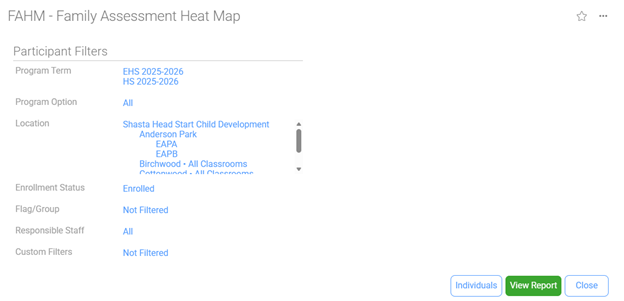
Select View Report
You can review all Family Assessments entered and use this tool to identify topics that may require a Resource/Referral (RR).
- Green and Gray: No action needed — the parent has indicated they are not interested in further resources at this time.
- Blank/White: Go back to the Family Assessment Event and enter the missing data.
- Red: The family is requesting a resource, referral or direct service therefore an RR must be offered.
For detailed instructions on completing the Resource/Referral process, refer to SOP Documenting Resource/Referral Offered and Follow-Up.
