
8.1.1.5
Health Insurance PIR Questions
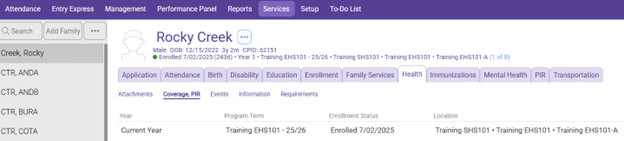
Select The Participant from the Participants List In the Services Tab
Click On the Health Section of Services, then click on the Coverage PIR section
Select the Current Year PIR File
Primary Health Coverage:
At Enrollment: Select Insurance information
At End of Enrollment: Select Insurance information (fill in at the same time you fill in At Enrollment)
Health And Dental Coverage
Medicaid Eligibility: Select Insurance information
Medicaid Number: Blank
Dental Coverage Select Insurance information
Dental Coverage Number: Blank
Other Health Coverage: Select Insurance information or leave blank if child does not have other or secondary insurance.
Insurance Number: Blank
Health/Dental Coverage Notes: If you select Other or no insurance enter brief notes as to what steps the family is taking to obtain insurance or what type of insurance the child has that is not listed.

Scroll Down to a Lower Section of The window until you see:
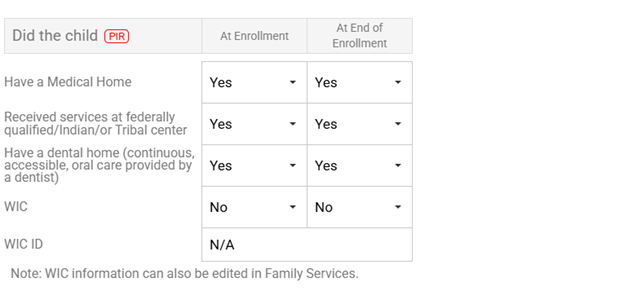
Did The Child:
Have A Medical Home: Indicate whether the child had a medical home At Enrollment and At End of Enrollment, If the child has a physical then mark Yes as having a medical home.
Received services at federally qualified/Indian/or Tribal center: Indicate whether the child had medical services through an Indian Health Service (ie rancheria) At Enrollment and At End of Enrollment.
Have a Dental Home(continuous, accessible, oral care provided by a dentist): Indicate whether the child had a dental home At Enrollment and At End of Enrollment.
If a HS child has a Dental Exam, then mark yes as having a dental home.
If an EHS child has a Physical Exam, then mark yes as having a dental home.
WIC: Indicate whether the child had WIC At Enrollment and At End of Enrollment.
WIC ID: NA
When filling out these questions, fill in both At Enrollment and At End of Enrollment fields at the beginning of the enrollment year. You can always go back and change the At End of Enrollment field, if necessary.
If the field is not listed above do not fill it in.
Click Save