
8.1.1.21
Failed Dental with No Treatment
When a child is dropping from the program or ending the school year and has not received dental treatment for a failed dental exam, Family Service staff must enter the reason for no treatment in Child Plus.
Select The Participant from the Participants List in the Services Tab, select the Health Tab, and then select the Events section
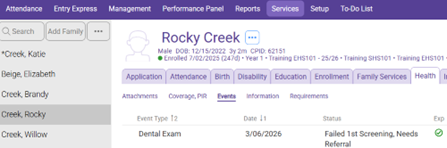
Open the failed dental exam.
Check the Treatment – Restoration, Pulp Extraction, Etc. Box, then check the “Treatment Not Received” box.
Select a Reason why the child did not get treatment from the drop-down list. If “other” is selected enter the reason in the event notes box
Click Save
