
8.1.2.3
Entering FPA Family Goals
FPA Family Goals are completed by Family Services staff, are due within 90 days of entry and must be entered into ChildPlus within 3 days of completion.
Select the participant from the list on the left then, click on the Family Services Module in the Services Tab of Child Plus
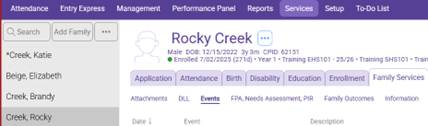
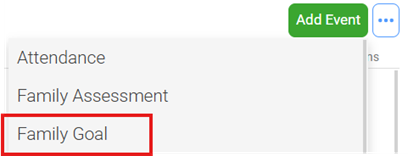
Click “Add Event”
Select “Family Goal” Event
Initial Date: Date goal is created
Description: Enter a short description of the goal (e.g., family will move to a new home)
Service Area: Assign one of the seven PFCE Family Outcomes (see PFCE Framework) Highlighted below

Issue: Choose the category from the dropdown menu (Family Assessment question) that best aligns with the goal created
Associated With: Defaults to “Entire Family”
Case Worker: Enter Family Service staff member’s name
Family Members: Enter the name of the family members working on this goal
Closure Expected: Date goal is expected to be completed
Progress: 1/4, 1/2, 3/4, Completed, or Started. Helpful hint: most will begin with started. For example, if a family has completed one out of four steps, select “1/4” completed.
Date Closed: Leave blank
Click “Save”.
If you have another goal to add under this child, click “Add Event” to add another event.
See FSEM Report Instructions to check accuracy of data input.