
8.1.2.4
Updating FPA Goals in ChildPlus
Family Services staff will check in with families regarding their Family Goals and update goals in ChildPlus in January, March, May/June (all Family Goals must be closed by June 30th) or when a child drops mid-year.
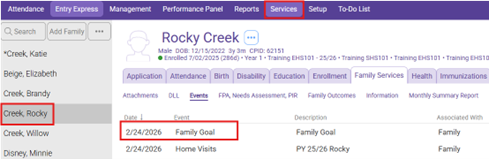
Select The Participant from the Participants List In the Services Tab, then select the family goal you would like to update in the “Event Category”
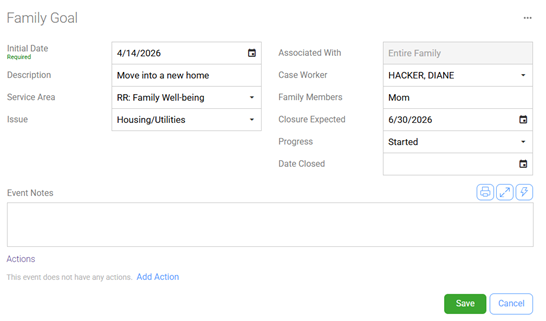
Progress: Enter Progress completion. (1/4 completed, 1/2 completed, 3/4 completed, completed, not applicable, started) For example, if a family is halfway to completing their goal, then select ½ completed. Family Services staff will make an educated guess on goal completion based on the information provided by family as to goal progression.
Date Closed: If the family goal is closed/completed enter the date the goal was closed/completed
Click “Save”
Important Note: to accurately report Family Outcomes, it is critical that progress on all Family Goals is updated at the end of every program year. Family Goal Outcomes are shared with the Policy Council, Board of Directors, Management, and Family Services staff at the end of each program year.