
8.1.1.4
Health Information Tab
Ensure that the Family Service Worker’s name is in following fields:
Health Services Tab:
Select The Participant from the Participants List In the Services Tab
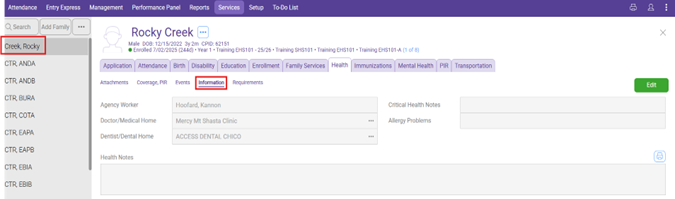
Click on the health section on the participants service tab, then click on the information section as shown below
Click the green Edit Button in the top right
Agency Worker: Family Service Staff Name
Doctor/Medical Home: Child’s Doctor/Medical Home
Dentist/Dental Home: Child’s Dentist/Dental Home
Critical Health Notes: Not required to be filled in, put notes of value here
Allergy Problems: Not required to be filled, Put Allergy(s) here
Click Save
Immunizations tab
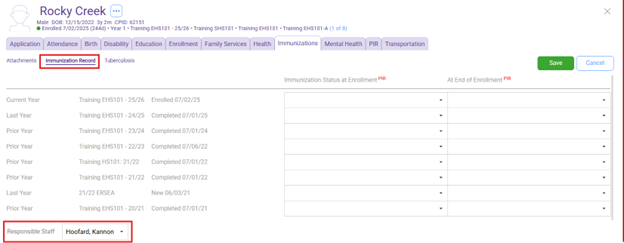
Click on the Immunizations section, then click on the immunization record section
Click the green Edit Button in the top right
Ensure the Responsible Staff Section Has the Family Service Worker selected through the drop-down menu.
Click Save
Family Services Information tab
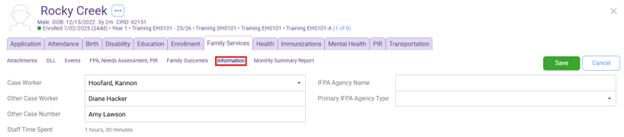
This is found by clicking on the Family Services Section than clicking on the Information Button
Click the green Edit Button in the top right
Case Worker: Family Worker (Dropdown Menu)
If a family is dual enrolled, Family Services staff will determine together who will take the lead in case management for that family. The lead Family Services staff member’s name will be entered in the “Case Worker” box, and the secondary Family Services staff member’s name will be entered in the “Other Case Worker” box.
IFPA Agency Name: Leave Blank
Primary IFPA Agency Type: Leave Blank
Click Save