
8.6.03
Family Demographics
Application Tab – General Information
Family Demographics
Enter within 3 days of completion
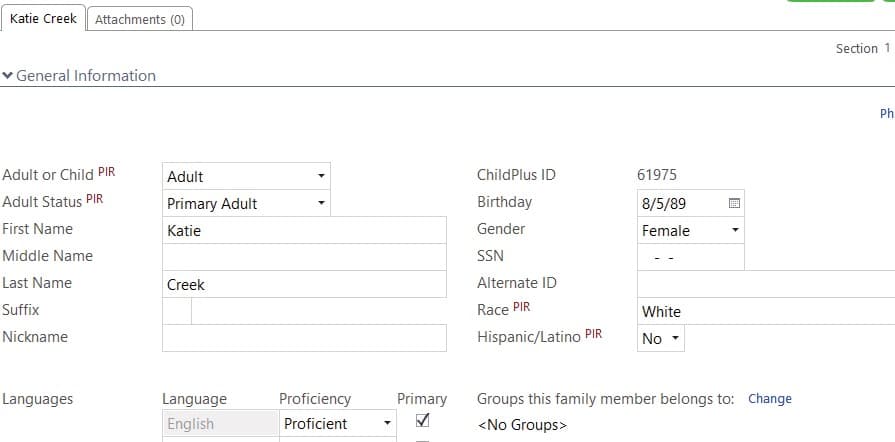
1. Select Participant
2. Click on Application Tab – Section 1
3. Ensure the enrolled child’s Birthday and Gender are correct.
4. Enter the enrolled child’s Race, Hispanic (Yes or No) & Primary Language.
5. Select Primary Adult and ensure their Birthday and Gender are correct.
6. Select Secondary Adult, if there is one, and ensure their Birthday and Gender are correct.
Application Tab – Additional Information
Family Demographics
Enter within 3 days of completion
1. Select Participant
2. Click on Application Tab – Section 2
3. Select Primary Under Additional Information, enter Lives with Family (Yes or No)
4. Select Secondary Adult, if there is one, Under Additional Information, enter Lives with Family (Yes or No)

Application Tab – Education Information
Family Demographics
Enter within 3 days of completion
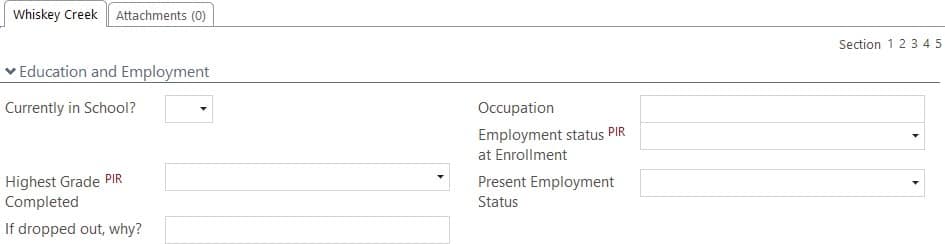
1. Select Participant
2. Click on Application Tab – Section 5
3. Select Primary Adult, under Education and Employment enter Employment Status at Enrollment, Education (highest grade completed).
4. Select the Secondary Adult, Under Education and Employment enter Employment Status at Enrollment, Education (highest grade completed).
Remember to input the Secondary Adult.
It is very important information that is aggregated on our PIR.
Application Tab – Family Information
Family Demographics
Enter within 3 days of completion

1. Click on Family Information (in blue, right above the Primary Adult’s Name)
2. General Information – Section 1
3. Choose Parental Status
4. Choose Primary Language At Home
5. Ensure Number in Household and Number in Family are correct.