
8.1.1.22
Entering Immunizations in Childplus
Children must be up to date on Immunizations before starting in the classroom

- Select the child to enter immunizations.
- Select Immunizations tab
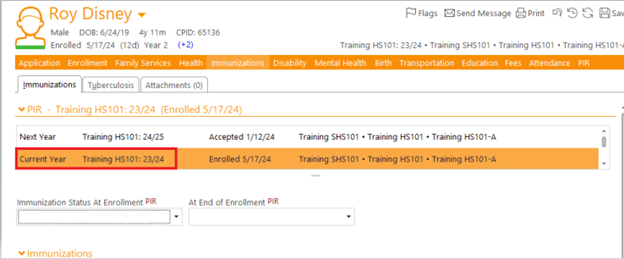
- Select the current school year
- Select the appropriate code for status At Enrollment and End of Enrollment:
- Completed all for age – child has received all required vaccinations for their age
- Exempt/Waiver – child has a medical exemption
- Not received all/Past due – child is missing vaccinations for their age
- Up to date all possible for age/behind – child is behind on vaccinations but is as up to date as possible at this time
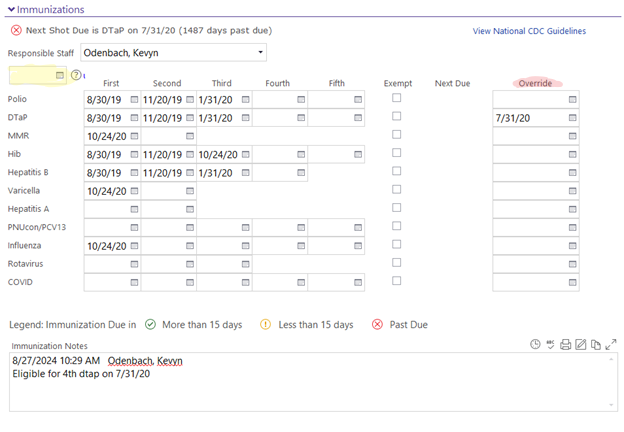
- Select Responsible Staff – Ensure the family services workers name is selected
- Enter all the immunization dates for each immunization.
For multiple immunizations completed on the same date, use the quick entry feature.
Tip: if you have access to the child’s blue card, use the blue card to transcribe the dates into Childplus.
- Use the Override Column to enter due dates for future immunizations that will be due. As future immunizations are completed, be sure to delete Override dates to remove them from your to-do list.
- Use the Immunization Notes sections to add any notes, follow up, or pertinent information.