8.1.2.3
FPA/SR Goals
Enter within 3 days of completion.
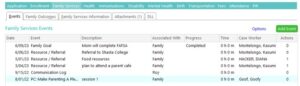
- Select the child from “My Participants”
- Select “Family Services” tab
- Select “Add Event”
- Select “Family Goal” from the “Add Family Services Event” box
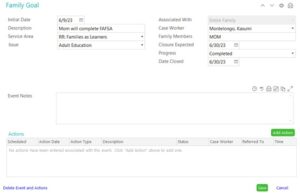
Initial Date: Date goal is created
Description: Enter a short description of the goal (e.g., family will move to a new home)
Service Area: Assign one of the seven PFCE Family Outcomes (see PFCE Framework)
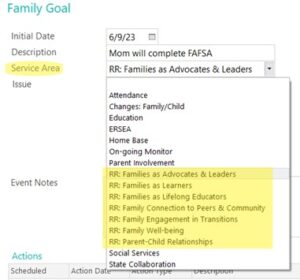
Issue: Choose the category from the dropdown menu (Family Assessment question) that best aligns with the goal created
Associated With: Defaults to “Entire Family”
Case Worker: Enter Family Service staff member’s name
Family Members: Enter the name of the family members working on this goal
Closure Expected: Date goal is expected to be completed
Progress: 1/4, 1/2, 3/4, Completed, or Started. Helpful hint: most will begin with started. For example, if a family has completed one out of four steps, select “1/4” completed.
Click “Save and Close”. If you have another goal to add, click “Add Event” to add another event.
See FSEM Report Instructions to check accuracy of data input.
Date Closed: Leave blank