
5.5.16
Custody/Court Documents
At the time of enrollment, the Family Service staff will:
- Request copies of any existing custody agreements or court orders from the enrolling parent or guardian
- Verify the authenticity of the documents by checking for official judges’ signature, stamp showing the document has been filed, case numbers and that all copies of the document are provided, for example, if it states there are 6 pages then all pages must be included. (In order to be considered an official court document, ensure the document presented is not a request for order or recommendation). If unsure, contact your Area Manager or the Family Services Manager.
- You may be presented with a temporary court or custody document, or a temporary restraining order, which means the order is in effect until the scheduled court date listed on the document. The temporary order is valid only until that date. After the court date or hearing, the parent must provide either a permanent order or official documentation extending the temporary order. If updated documents are not provided, we can no longer follow the guidelines of the temporary order.
- Thoroughly review custody documents to understand the legal custody status and any visitation rights. Contact your Area Manager or Family Services Manager if you have questions.
- If a family has joint custody, each parent must complete an Emergency Card for the days they have physical custody of the child. Please explain to parents that we cannot withhold a child from a biological parent, regardless of the custody arrangement. Staff will follow the Emergency Card provided by the parent who has custody on that specific day.
- Please remind parents, it is their responsibility to follow the custody arrangement.
- If a parent wants to be the first person contacted in an emergency on a day they do not have custody, they must ask to be listed as the first contact on the alternate parents’ Emergency Card. Otherwise, staff will call the first emergency contact listed and continue down the list until someone is reached who can respond to the emergency.
- Advise parents or guardians to provide updated documents promptly if there are changes in custody arrangements.
- Make sure to share information with classroom staff and site supervisor.
After receiving court documents from parents, the Family Services staff will:
- Complete the Court Document Scan Cover Sheet
- Scan the cover sheet and the court documents to the Custody Doc scan folder
- Place a blue dot on the child’s file to indicate that custody documents, a restraining order, or any documentation showing alternative legal guardianship is on file.
- File the court documents in the Blue-Enrollment Section based on the Enrollment Cover Sheet.
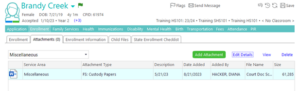
The Family Services department will review and attach the documents in ChildPlus under the “Attachments” module > Miscellaneous > “FS: Custody Papers”
When parents inform us that they are in the process of obtaining or modifying a custody order, we cannot follow the modified order until we have a judge approved physical copy on file.
Family Services staff must ensure the court documents have been attached in CP. If after 3-5 business days you do not see the court documents attached, contact the Family Services department. (See SOP 8.1.7 Viewing Custody/Court Doc Attachments in CP)
Resources: