
4.1.3
Child File Check-In Process
The Family Worker or Home Visitor will
- Gather and bundle all required child files in accordance with SOP 4.1.2 – Closing Child Files, Child File Packaging Requirements
- Place each program year’s bundled files into the manila envelopes provided by the Family Services Department.
- Clearly and correctly label each envelope, ensuring the program year information matches the requirements outlined in SOP 4.1.2 – Closing Child Files.
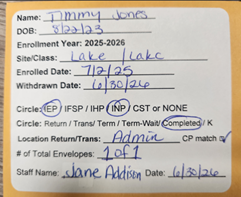
- Verify Enrollment History
Using the Enrollment History section in ChildPlus, the FW/HV will verify that files for every program year are accounted for. - If files are missing, contact the Family Worker/Home Visitor responsible for prior years or the Data Systems Coordinator.
Example: A child enrolled for three program years should have three separate program-year file sets.

Using this example, this participant should have 3 sets of files to be bundled together.
- Rubber-band each program year’s file set separately. Once all program years are individually bundled, use an additional rubber band to bundle all years together.
- Schedule an appointment with the Data Systems Coordinator to drop off the files. The Family Worker/Home Visitor is expected to remain present while the Data Systems Coordinator reviews the files for completeness, accuracy, and proper bundling.
File Check-Out Note
If a Family Worker needs to check out a file from the Admin Center, they must contact the Data Systems Coordinator to schedule an appointment for file transfer.