Run a Class Contact Information – Licensing Report (#1520)
Run a Class Contact Information – Licensing Report (#1520)
This report provides each child’s emergency contact Information, used for licensing purposes in the classroom. It mirrors the Emergency Contact Card. Usually, this report is run in combination with the 2125 Alphabetical Participant List.
Note: Any changes to the Emergency Card need to be entered in ChildPlus. [Link to CP: CP-Enter and Update Emergency Card Information] Once you have made these changes, you need to reprint the 1520 Report for the Licensing file at the Center.
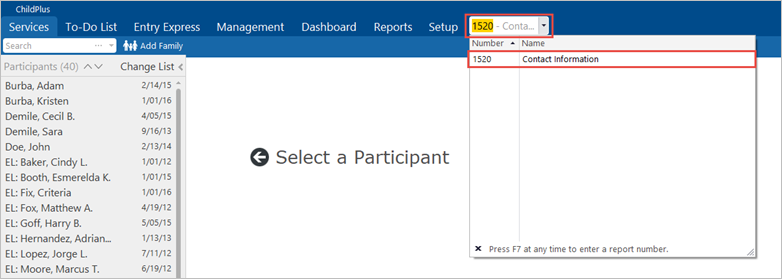
- In the Enter Report # field, type “1520.” Click on the report title: Contact Information.
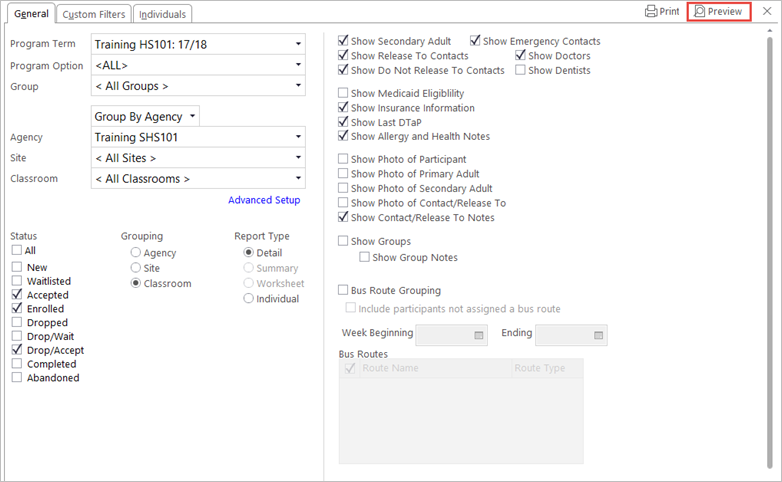
- In the Program Term field, select the relevant program year from the drop-down list.
- In the Program Option field, select “All.”
- In the Group field, select “All groups.”
- In the Agency field, select “Shasta Head Start Child Development.”
- Select the relevant Site.
- In the Classroom field, select “<All Classrooms>.”
- In the Status section, select “Enrolled” and “Accepted.”
- In the Grouping section, select “Classroom.” Each class will start on a new page.
- In the Report Type section, select “Detail.”
- On the right side of the screen, select the following report criteria:
- Show Secondary Adult
- Show Emergency Contacts
- Show Release To Contacts
- Show Doctors
- Show Do Not Release To Contacts
- Show Insurance Information
- Show Last DTaP
- Show Allergy and Health Notes
- Show Contact/Release To Notes
- Click Preview.
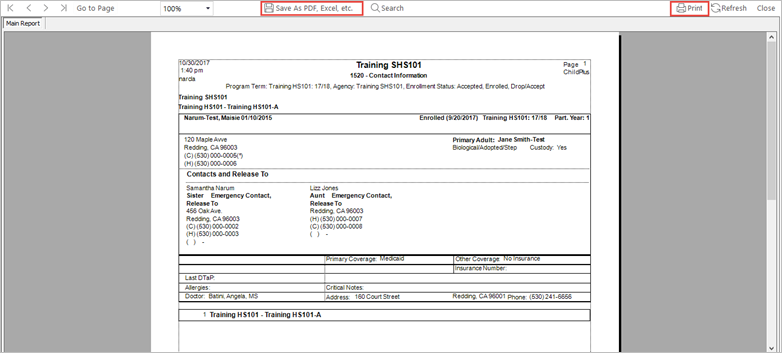
- When the report displays, click on the Save button to save it as a .pdf file. Click the Print button to print.