Update a Family’s Address and Phone Number
Update a Family’s Address and Phone Number
- On the Services tab, in the Participants list, click the relevant person’s name.
Note: If the participant is not included in the list, click the Change List button. Alternatively, use the Search field above the list to locate the child.
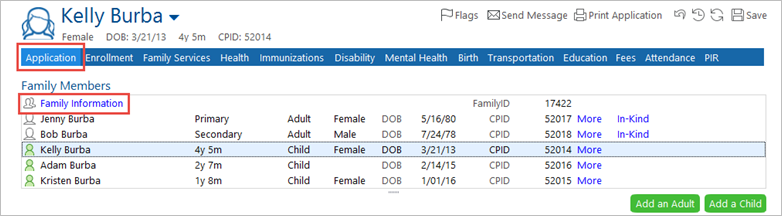
- Click the Application
- Click the Family information link at the top of the list of children.
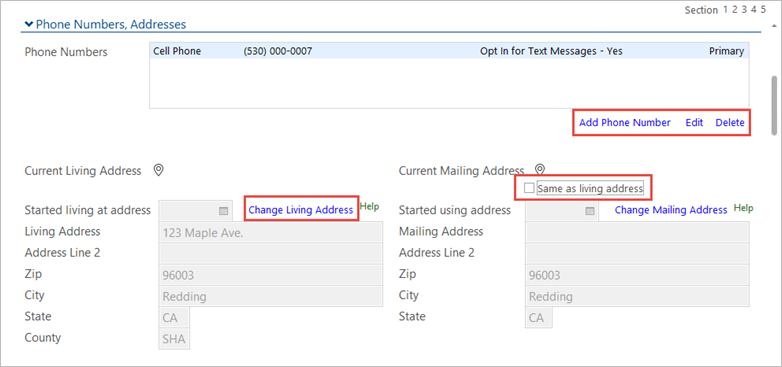
- Scroll down to the Phone Numbers, Addresses
- To update the phone number, click on the Add Phone Number, Edit, or Delete Make changes as necessary, and click Save.
- Click the Change Living Address link, then select the Add New Address link to update the address.
- Put in today’s date, or the date the parent notified you of this change.
- To enter a mailing address if it is different from the living address, deselect the Same as living address Then enter the mailing address.
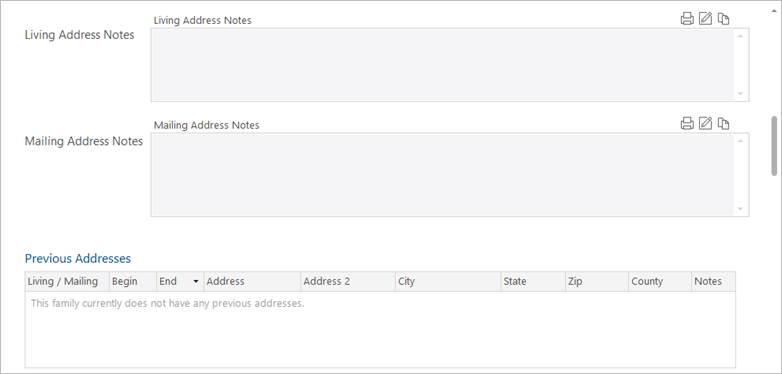
- If needed, enter any Living Address Notes or Mailing Address Notes.
Note: ChildPlus keeps a record of all previous addresses entered in the system.